A property management system has obvious fields: rent, lease start date, resident name, unit number. Those fields are easy to put in an import template because every target system expects them.
The harder data is what a property management company added for itself: HVAC filter dimensions, gate-code preferences, parking sub-spaces, pet registration numbers, owner payment preferences, inspection conventions, and local operating notes.
That information may not be part of the vendor’s standard schema, but it is part of how the business runs. When a rigid migration ignores it, the import can pass every standard reconciliation check while years of institutional knowledge quietly disappear.
A standard schema only describes the common layer
No two property management firms use the same system in exactly the same way. Teams extend a platform through configurable fields, labels, notes, exported spreadsheets, and local conventions. Over time, those additions become a secondary operating model layered on top of the PMS.
The problem is not that custom fields are inherently messy. The problem is that many migration plans never inventory them. If a source attribute is absent from the approved mapping workbook, it may also be absent from validation totals and exception reports.
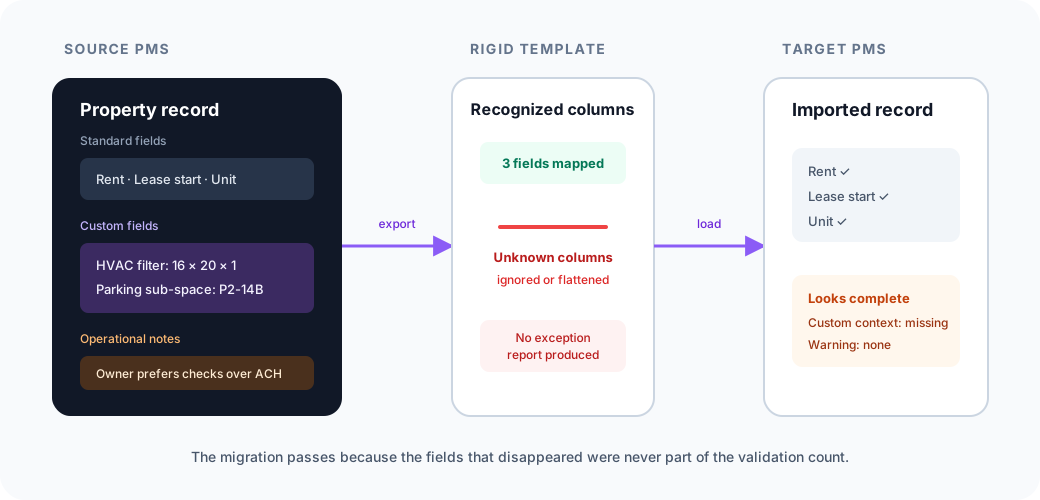
The target record looks complete because the migration only measured the fields it expected to receive.
Where operational knowledge gets lost
| Source information | Common migration treatment | Resulting risk | Safer treatment |
|---|---|---|---|
| Named custom field | Ignored if no target column exists | Operational attribute disappears | Map, create a supported custom field, or preserve with an explicit exception |
| Free-text note | Copied into one comments field | Context becomes hard to search or act on | Preserve the original note and extract reviewed structured attributes where useful |
| Spreadsheet maintained outside the PMS | Excluded from the migration scope | Local workflow knowledge stays behind | Inventory it as a source and connect rows to target entities |
| Source field with no target equivalent | Forced into the nearest standard field | Meaning changes without a visible warning | Hold for a documented target decision |
The notes graveyard is not a data strategy
When a target does not support the source model, migration teams often concatenate everything into a general notes field. That preserves characters, but not necessarily utility.
A sentence such as “Service animal documentation verified on 6/12/23” contains several possible attributes: an accommodation indicator, a document status, and a verification date. Extracting those values can make them searchable and usable in downstream workflows.
But extraction must not replace the original evidence. A model can propose that the note implies Service_Animal: Yes and Verification_Date: 2023-06-12. The migration should retain the source note, show the proposed interpretation, and route ambiguous or sensitive cases for review. AI should help classify knowledge—not silently rewrite it.
Preservation begins before mapping
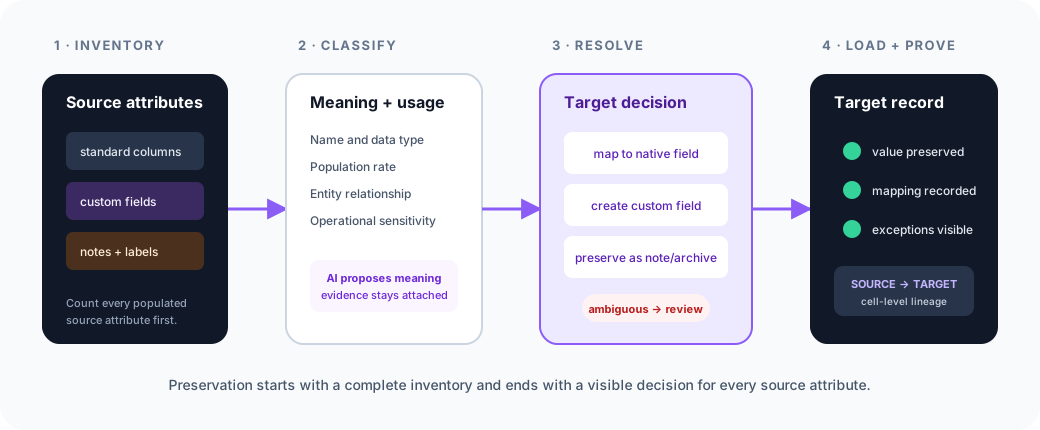
A reliable process starts by building a complete source inventory. For every standard field, custom attribute, and relevant note collection, the migration should record:
- Which entity owns it: property, unit, resident, lease, owner, or another record.
- Its data type, population rate, sample values, and historical usage.
- Whether the target has a native field, supports custom fields, or requires an alternate landing zone.
- Whether the value carries legal, privacy, or operational sensitivity.
- How the final target value can be traced back to its source.
This changes the migration question from “Which source columns match our template?” to “What information exists, and what explicit decision will we make about each part of it?”
Target capability sets the boundary
Not every target system allows a migration tool to create arbitrary fields. API permissions, product tiers, field-type restrictions, and data governance rules can all limit what is possible.
A trustworthy migration does not hide those limits. It produces a decision for every source attribute:
- Map it to an equivalent native target field.
- Create it as a target custom field when the platform and customer approve.
- Transform it into a reviewed structured attribute derived from source evidence.
- Preserve it in a searchable note or archive when no structured destination exists.
- Escalate it when the meaning or destination is ambiguous.
The goal is not to force every source value into the target at any cost. The goal is to prevent unreported loss.
Validation must count what was discovered
Standard reconciliation asks whether 10,000 resident rows left the source and 10,000 arrived in the target. Custom-field validation asks a different set of questions:
- How many populated source attributes were discovered?
- How many received an approved target decision?
- How many values loaded successfully?
- Which attributes were archived, transformed, or held for review?
- Can a reviewer trace a target value to its source row, column, note, and transformation?
Without that denominator, “migration complete” only means the standard template completed.
A migration should preserve the business, not just the database
Custom fields are often treated as edge cases because they are not shared across every customer. For the property manager who depends on them, they are not edge cases. They are operating instructions.
Elvity’s PropTech data onboarding platform inventories source attributes before mapping, proposes target structures with evidence, keeps ambiguous decisions visible, and preserves lineage from source to target. It is designed to make missing context an explicit migration decision rather than a surprise after go-live.
A software upgrade should not require a company to relearn what its old system already knew.
Preserve the fields your customers actually use
See how Elvity inventories custom attributes, documents target decisions, and keeps source evidence attached throughout migration.