
In many domains, the gap between a plausible prototype and a production-quality tool is full of "boring" stuff. And data migration is no exception.
If you lead an Implementation, Operations, or Customer Onboarding team, you’ve probably looked at modern AI tools and thought:
"Why do we need a dedicated data migration platform? We'll just spin up a shared AI workspace or script, drop in the customer's messy spreadsheets, and let the AI clean, map, and standardize the data for us."
It sounds modern and exciting.
"Exciting" means an LLM silently hallucinated a transformation across 400 rows and nobody noticed until billing ran. "Exciting" means your team is frantically digging through a 300-message chat transcript trying to prove who approved a custom mapping rule. "Exciting" means an external customer lead gets confused by an open-ended conversational prompt and your 4-week onboarding timeline blows out to 12.
The hard-earned truth of enterprise data onboarding is this:
Reformatting columns with an AI model is easy. Everything that makes a customer data migration production-worthy is very boring.
And that is why we have built a rather boring data migration tool.
The Illusion of Collaborative AI Workspaces
General-purpose AI workspaces are fantastic for creative knowledge work: brainstorming product specs, synthesizing customer feedback, drafting marketing copy, or running ad-hoc Python snippets.
They are not built for the high-stakes, multi-stakeholder operational plumbing of enterprise data migration.
When you try to run customer data onboarding through an AI chat canvas, you solve the mechanical 10% (reformatting data in memory) while crashing headfirst into the unglamorous 90% that actually dictates whether an onboarding project succeeds or fails.
Here is the "boring" infrastructure that general-purpose AI workspaces simply cannot provide:
1. Boring Collaboration (The "Linda from Billing" Dilemma)
When an AI workspace processes a customer's raw dataset and encounters an ambiguous field—like Status_Code: "99 (Pending Memo)"—the AI politely asks in the chat: "How would you like me to handle this value?"
The problem? You don't know.
The only human on earth who understands what Status_Code: 99 meant in the legacy system is Linda, the customer's Director of Billing.
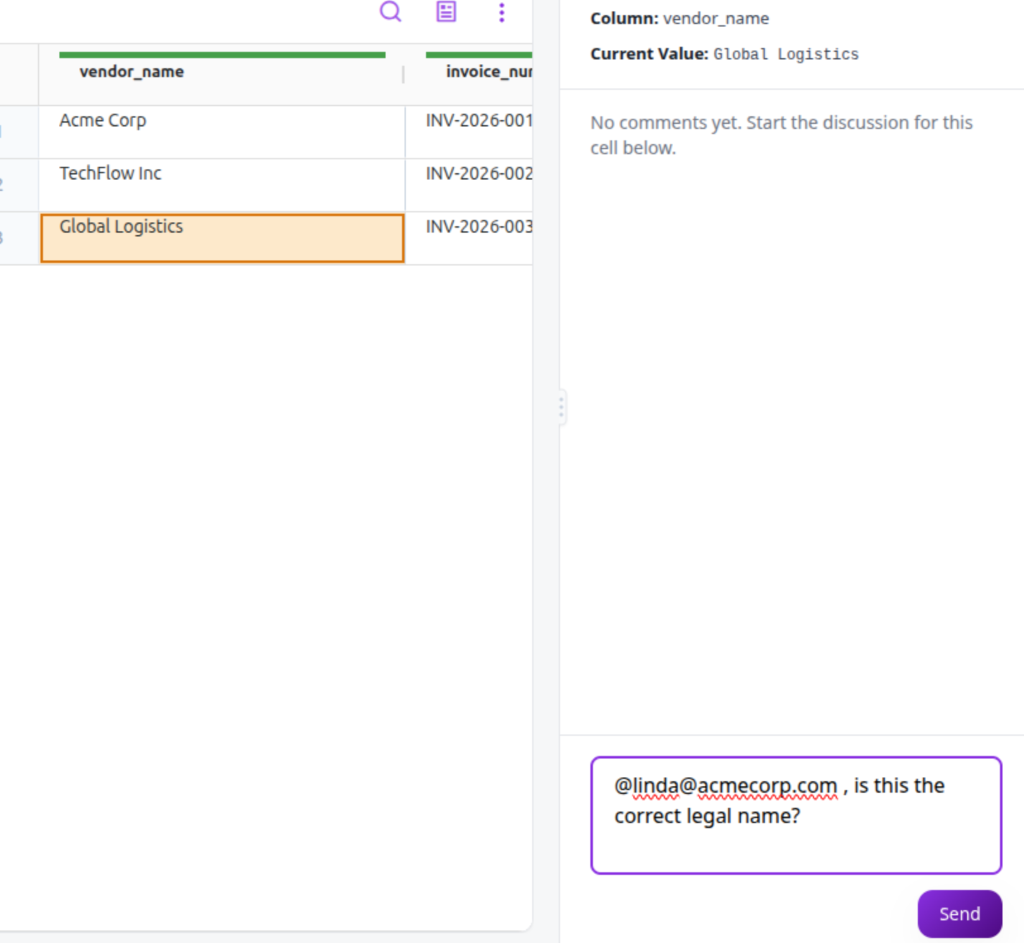
- You cannot invite Linda into your internal Claude workspace without exposing internal prompts, system instructions, and other customer data.
- Even if you could, Linda does not want to prompt-engineer an AI model in a chat window. She wants to see her data in a structured, familiar interface.
So the "exciting" AI workflow immediately collapses back into the classic spreadsheet nightmare: your team exports an error file, highlights the bad cells in yellow, and emails Customer_Errors_v4_FINAL.xlsx to Linda.
What you actually need is a purpose-built, client-facing Data Portal. A secure sandbox where external data owners can see their own data in an interactive grid, with highlighted validation errors and guided, self-serve corrections—with zero chat prompt confusion and zero email attachments.
2. Boring Explainability (Deterministic Rules vs. Chat "Vibes")
When an LLM in a shared workspace transforms a 50,000-row file, it provides a conversational summary: "I standardized the date formats and mapped customer tiers based on spending thresholds."
Three weeks after go-live, the customer's VP of Ops calls your executive team:
"Why did 300 of our legacy enterprise accounts show up as basic self-serve tiers in production?"
If your migration happened in an AI workspace, your answer is: "Well, Claude decided that based on the conversation in our project thread." That is a fast track to customer churn.
A production-grade migration tool does the dull, essential work of making every single transformation deterministic, explicit, and human-readable:
Rule #12: If
Account_Age > 24moANDAnnual_Spend < $10,000, map toTier_Basic. (Created by Alex, Approved by Client Lead on Aug 12).
No black boxes. No guessing. Just transparent, verifiable business logic that non-technical stakeholders and compliance leads can review and sign off on before a single record touches production.
3. Boring Audit Trails & Forensic Lineage
In enterprise onboarding, you aren't just moving files; you are taking custody of a company's historical operating record.
Six months after go-live, an external compliance auditor asks:
- Where did row 4,812 in your production database come from?
- Was it extracted from a spreadsheet coordinate or OCR'd from a PDF invoice?
- Who approved changing that field from a string to a timestamp, and at what exact second?
A scrollable chat transcript in an AI workspace is not a SOC 2-compliant audit trail.
A production migration platform does the meticulous bookkeeping: immutable cell-level lineage.
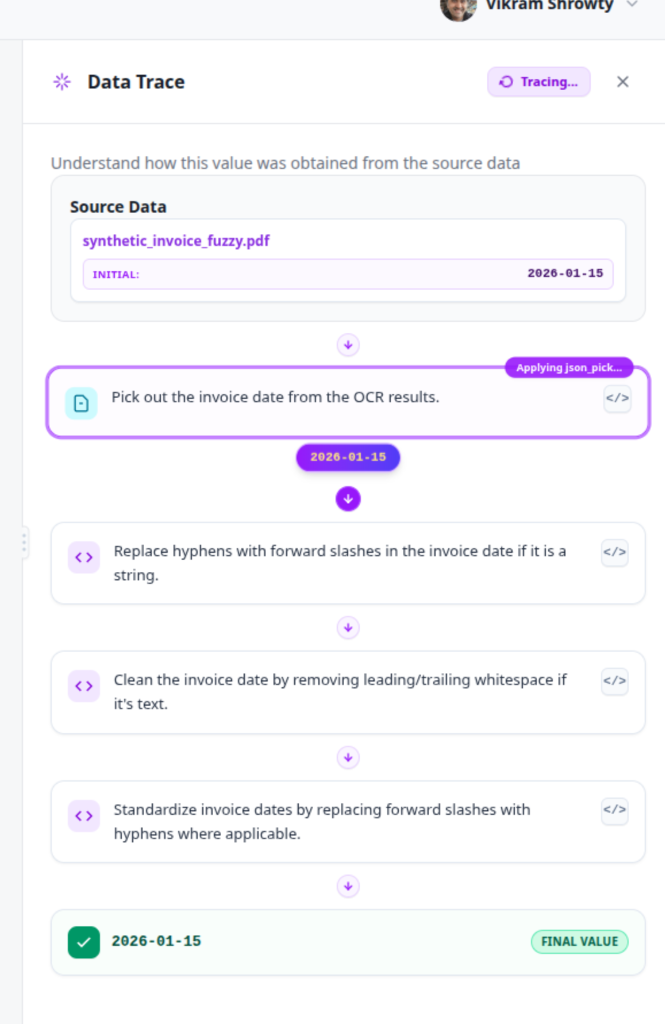
With Elvity's Data Trace, anyone on your team or the customer's team can click on any cell in the production grid and inspect the exact multi-step transformation pipeline—from the raw source file, through every OCR extraction and regex cleaning step, to the final verified value.
4. Boring Self-Healing & Drift Resilience
Customer data is never a one-and-done event.
Next month, when the customer onboards a second division or uploads their quarterly refresh, they will change column Employee_ID to emp_num and flip date formats from MM/DD/YYYY to DD/MM/YYYY.
If you are using shared AI chat workspaces, you are perpetually stuck in prompt-engineering mode—re-uploading files, re-prompting the AI, and manually verifying that previous assumptions didn't silently break.
A real migration platform provides automated, Self-Healing Schema Drift Detection. It recognizes renamed headers, applies deterministic fuzzy patches, alerts your team, and keeps the ingestion pipeline running smoothly without manual intervention.
If You Want Boring, Predictable, and Reliable Data Migrations, Use Elvity
General-purpose AI tools are exciting. But when your team is responsible for onboarding enterprise accounts where a single bad record can halt payroll or break billing, excitement is the last thing you want.
You don't want:
- Ambiguous AI transformations governed by conversational "vibes."
- Critical mapping decisions buried in team chat threads.
- Awkward email chains trying to get external clients to verify bad rows.
- Zero audit trail when an auditor asks for provenance.
You want your customer data migrations to be boring, predictable, and reliable.
At Elvity, we spent years building the unglamorous, production-grade infrastructure: the client-facing collaborative portals, the explainable rule engines, the immutable cell lineage, and the automated drift resilience.
So that when you onboard your next enterprise client, nothing exciting happens. The data maps cleanly, the client fixes their own edge cases, the audit log records every step, and the project finishes on time.
Ready for customer data migrations that are predictable, audited, and uneventful? Learn more and request a demo at www.elvity.ai today.